I have worked in Learning and Development for a long time, and one thing I have learned is that safety advice only sticks when people actually practice it.
You can tell students to "be careful online" a hundred times, but that phrase is too vague to be useful. Careful how? With which setting? On which platform? What should they do if a stranger messages them? What does a strong password look like? Where do they turn on two-factor authentication? What should they check before posting about a holiday, tagging a friend, or clicking a link?
I see this at home too. My son uses social media every day, and like most teenagers, he is not waiting for a lecture about online safety. But practical questions are different. Show me where your privacy settings are. Who can message you? Is your account public? What apps have access to your account? Could someone guess your password? Those questions are concrete enough to act on.
That is why social media safety works best when it is practical, not scary. Students do not need another vague warning about the dangers of the internet. They need to know what to check, what to change, and what to do before something goes wrong.
The basics go a long way: a private account, strong privacy settings, care with location sharing, thinking before tagging or posting, and caution with messages from strangers. Students also need to recognize phishing and scams, like urgent messages or links that ask for passwords or codes. Safety habits stick best when students practice them on their own settings, not just hear about them.
Social media safety often gets taught as a list of warnings, but students need something more usable than "don't do anything risky." They need to know the small practical steps that reduce risk: stronger passwords, private accounts, two-factor authentication, careful posting, and knowing when not to respond. Those habits matter because most online safety problems do not begin with one dramatic mistake. They begin with ordinary choices that feel harmless at the time.
Account security is a good example. A weak password might not feel like a big deal until an account is taken over, messages are sent from it, or private information becomes visible. The FTC recommends two-factor authentication because even if someone gets your password, they still need a second code or method to get into the account. CISA describes multi-factor authentication as one of the most effective ways to protect accounts. (FTC)
The same is true for privacy and posting. A public account, location details, an unknown DM, an embarrassing tag, a phishing link, or a holiday post that says your house will be empty may not feel dangerous in isolation. But students need to recognize those situations before they become problems and feel confident enough to pause, check, and make a safer choice.
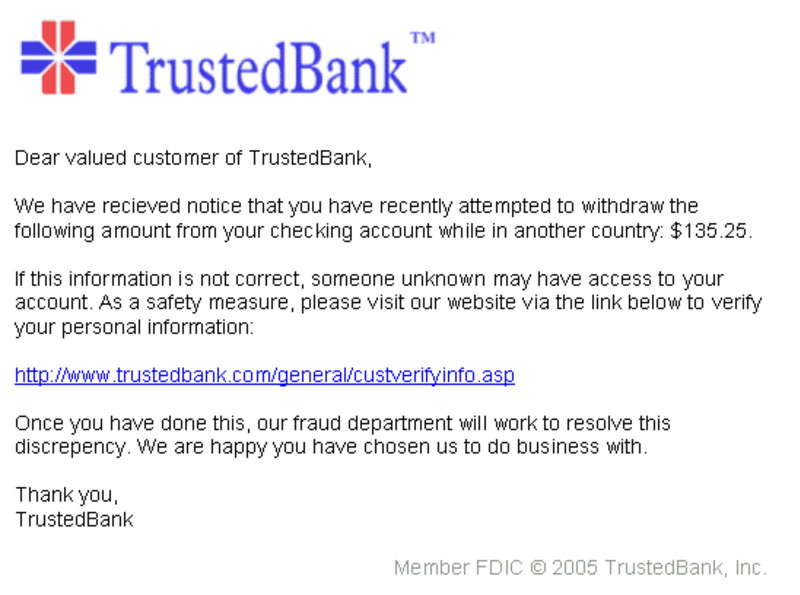
A mock phishing email, complete with a bank logo, urgent language, and a link designed to look legitimate. Students who can spot the tells before clicking are much harder to fool. Photo: Andrew Levine, public domain.
That is the thinking behind Using Social Media Safely, a group activity for ages 12 to 18 that fits well in digital citizenship, media literacy, social media literacy, wellbeing, advisory, or life skills lessons. Students do not just talk about online safety in the abstract. They open the settings on a platform they actually use, check privacy and security options, look at password strength and two-factor authentication, and work through realistic scenarios involving DMs, tags, phishing links, harassment, oversharing, and digital footprints. The aim is simple: help students leave the lesson with practical actions they can use right away.
| Ages | 12–18 |
| Group size | 3–4 students |
| Time | 60–70 minutes |
| Works for | Digital citizenship, media literacy, social media literacy, wellbeing, advisory, life skills |
The activity is built in three parts. In Part 1, students choose a platform they actually use and find the privacy and security settings. They check what the app can see or share by default, whether their account is public or private, and who can view their posts, followers list, or location information.
In Part 2, students work through a practical safety checklist. They check whether their password is strong, find and turn on two-factor authentication if appropriate, review who can see their content, remove connected apps they do not recognize, and look back through recent posts to consider what their digital footprint says about them.
In Part 3, students create group ground rules for responsible social media use, then apply those rules to realistic scenarios. These include a stranger asking where they go to school, a friend tagging them in an embarrassing photo, a joke being misunderstood and reported, someone in class being targeted with nasty comments, a phishing DM offering free concert tickets, and posting about a family holiday before leaving home.
The lesson also includes a teacher guide with timing, platform-choice notes, scenario guidance, differentiation ideas, and an assessment rubric. The rubric focuses on privacy and security knowledge, password and account security, scenario responses, ground rules and group discussion, and quality of reflection, so students are assessed on practical judgment rather than just remembering safety slogans.
This lesson works best when students do the checking themselves. Talking about privacy settings is easy to ignore. Opening the settings on a real account is different. Some students will discover things they did not expect, such as an account being public, old connected apps they no longer use, or message settings that allow strangers to contact them.
A tricky moment can come when students feel embarrassed by what they find. Keep the tone practical and calm. If someone realizes their password is weak or their account is more open than they thought, treat that as useful information, not a failure. The point is to make the safer choice now.
The scenarios tend to be where it clicks, especially tagging, harassment, and posting about holidays. Ask students: "What is the safest useful action here?" That wording matters. It avoids both extremes: doing nothing because it feels awkward, or overreacting because they are scared. Good online safety is usually about small, clear actions taken early: block, report, untag, change a setting, ask directly, wait before posting, or get help from an adult when needed.
Using Social Media Safely is part of the Social Media and Digital Life bundle, a collection of activities that help students think more clearly about online behavior, digital citizenship, privacy, media literacy, and the choices they make in public digital spaces. Use it as a standalone lesson on social media safety, privacy settings, passwords, two-factor authentication, phishing, harassment, or digital footprints, or as part of a wider sequence on media literacy and digital citizenship.